When Should Your Local AI Ask a Bigger One for Help?
A cookbook problem, and a rebuild
I love physical books, cookbooks very much included: the stains on the pages that mark the recipes actually worth making, the ones inherited from family, the ones bought on holiday for no good reason at all. What I do not love is that a shelf of forty cookbooks is a genuinely poor way to answer, “What can I make with what is in my fridge?”
Digital and physical each do something the other cannot. I wanted the soul of a physical book with the searchability of a digital text. A few months ago, I tried to digitise my collection and failed, the way most side projects fail. I would photograph a recipe page, run it through basic OCR, and watch the ingredient list come out mangled. I tried cleaning up the mess with a local AI model, then tried skipping OCR altogether to have a vision model read the photo directly. Neither reliably worked.
This week, I rebuilt it in an evening. It runs entirely on my own network, securely reachable from my phone over a private connection. I would rather own the infrastructure I depend on than rent it from large companies. But the most interesting design decision wasn’t about the hardware or the privacy. The interesting design decision was deciding, for each part of the system, how much model it actually needed.
How a photo becomes a recipe
Underneath the escalation logic, the actual pipeline is fairly simple. A photo goes in one end, and a searchable recipe comes out the other:
- Auto-formatting: The photo is straightened and cropped automatically before anything else touches it.
- Document merging: Multiple photos of the same recipe are combined into one document if a page runs long.
- Text extraction: That document is turned into raw text, using the light OCR path first.
- Data structuring: A local model reshapes the raw text into a consistent set of fields: title, ingredients, steps, tags, timing, source book, and page.
- Search indexing: The result is saved, thumbnailed, and indexed for search, ready within seconds of the photo being taken.
The whole thing usually finishes before I have put the book back on the shelf.
Starting light, escalating when needed
The first version used the cheapest tools I had: a self-hosted PDF toolkit to pull raw text, which then goes to a small model running through Ollama to reshape it into a structured recipe. For clean, flat photographs, that combination is fast and good enough. For the pages I could not lay flat, it kept coming out mangled.
The fix was recognising that some photos need a heavier tool, and most do not.
Now, the light path stays the default. But a heavier, vision-capable model—also running locally—is just one tap away for the pages that actually need it. The app flags when almost no usable text comes through, and I can choose to reprocess it by having the heavier model look directly at the photo itself. Those same difficult pages that used to defeat the whole pipeline now come out clean.
I think this is a more honest, efficient way to build with AI than either extreme: we shouldn’t route every simple request through the biggest, most expensive model available, nor should we stubbornly force a small model to handle complex edge cases. Match the tool to the difficulty of the page in front of you.
One shape for every recipe
Regardless of how differently the original physical pages laid them out, the model forces every recipe into that same structured shape. A handwritten card and a glossy cookbook page end up identical on the backend.
On top of that structured text, the app turns each recipe into an embedding—a mathematical fingerprint of what the recipe actually means, not just the words it happens to use. Plain keyword search only works if you type exact matches. Semantic search finds the meaning: asking for “something fresh and fruity” surfaces a lemon tart, and “something warming for a cold evening” surfaces a stew, even if those exact words appear nowhere in the text.
A small assistant, and a door to bigger ones
The app has its own built-in cooking assistant: a small, playful chat that runs on that same lightweight local model. It can search my recipes, suggest something to make based on my fridge inventory, and answer a quick question while I am standing at the stove. It doesn’t need to be smarter than it is.
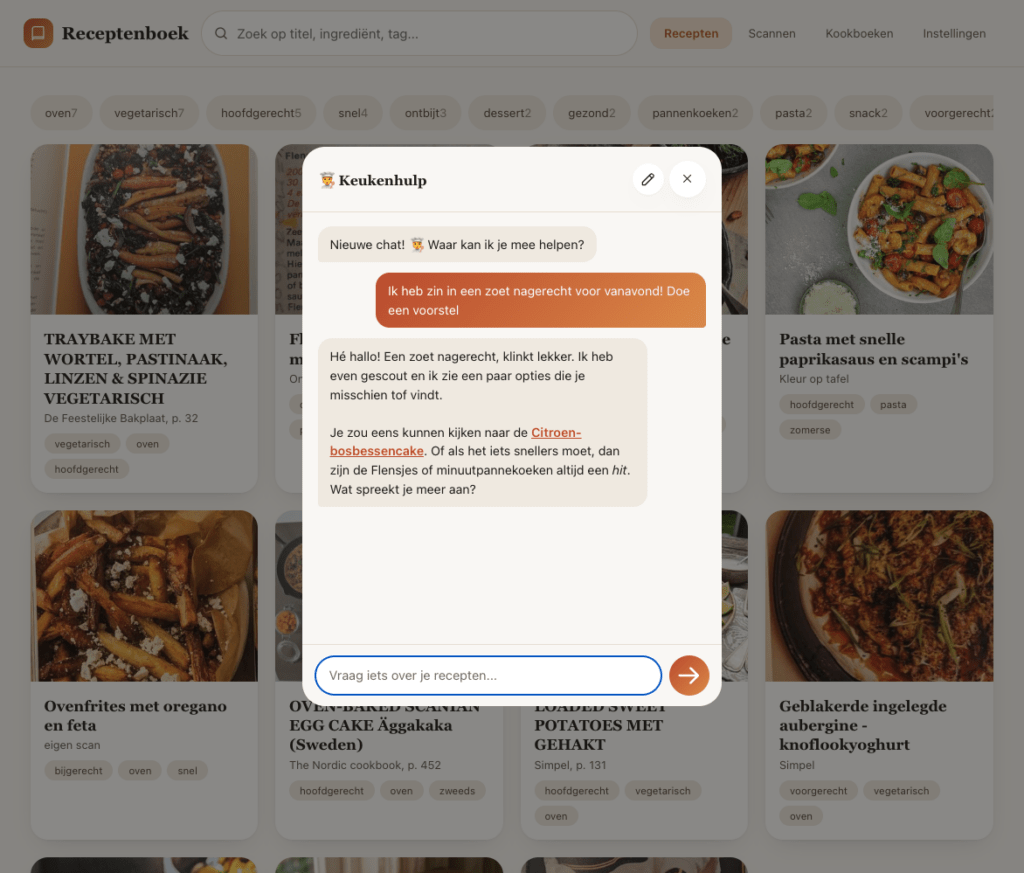
For anything heavier—like planning a week of meals around a specific diet, or cross-referencing a recipe against notes I keep elsewhere—I don’t force the small assistant to struggle. Instead, I hand the whole context over to something bigger, like Claude or my own larger AI assistant, Hermes. They can reach into the recipe collection through an MCP (Model Context Protocol) connection.
The small assistant lives inside the app because it only needs to answer small questions. The heavy reasoning happens outside of it.
Infrastructure for questions I haven’t asked yet
None of these tools were built to work together according to some grand plan. I have Zotero for research, Obsidian for notes, Home Assistant for my house, and now this recipe collection. Each solves a single, small problem. But because they share the same language for being reached, each new tool becomes available to everything else already sitting in the toolbox.
If I decide next year that I want a weekly menu planned automatically, I am not starting from scratch. The structured recipes, the semantic search, the connection any assistant can use—that backbone already exists.
What six months actually bought me
Six months ago, the cookbooks sat exactly where they had always sat: unsearched, answering nothing unless I started flipping pages. I had one struggling pipeline, mangled ingredient lists, and no real sense of when to reach for something stronger. Now I stand in the kitchen, ask what I can make with a sad half-bag of spinach, and get pointed at an actual recipe on an actual page. Getting the recipes structured, searchable, and reachable by the right size of AI was the actual hard part.
The physical books themselves are still sitting exactly where they always have on the shelf. But they are no longer trapped there. And because the entire system lives securely on my own network, nothing is being broadcast to the wider web—I am simply unlocking the physical library I already bought and own, not reproducing them. Ownership is a rare thing in the subscription era.
But now, whether I am standing at the stove needing a quick substitute, querying my larger assistant while stuck on a train, or letting an automated script plan my groceries for the week, I have a dozen different ways to reach into those pages. I don’t have to wait until I am home, flipping through paper. The books are on the shelf, but the knowledge inside them is finally exactly where I want it to be.
Where this note connects
Start a reading path from here Open in the knowledge graphLinked notes
- AI Without the Handover: Managing Research with Model Context Protocol Managing local research libraries with AI leads to a broader architectural question: when should a small local model hand a task over to a larger one?
- How I actually used GenAI in 2025 Sorting through practical everyday uses for generative AI evolves into designing a local recipe system that knows when to ask a larger model for help.
- What Happens When AI Starts to Remember? Exploring how AI systems handle memory and context leads into another practical design puzzle: combining local models with larger cloud ones.
- How I built a private AI to conquer my reading list Just as a private AI can tame an overflowing digital reading pile, a hybrid local-and-cloud AI setup can solve the everyday problem of searching physical cookbooks.
- Building my sixth tool for qualitative analysis with Generative AI Building custom AI tools for qualitative analysis shares the same hands-on tinkering spirit as rebuilding a personal cookbook search tool with local models.
Threads ideas this note shares with others · pick one
Theme · also in Data Ownership and Privacy See this thread in the graph →
Framework · also in Model Context Protocol See this thread in the graph →
Methodology · also in Building Your Own Tools See this thread in the graph →
Methodology · also in Local and Private LLMs See this thread in the graph →
Methodology · also in Personal Knowledge Management See this thread in the graph →
Methodology · also in Right-Sizing Models See this thread in the graph →
Methodology · also in Semantic Search and Embeddings See this thread in the graph →